How to Integrate Shopify and NetSuite Using Celigo
1. Introduction
For growing e-commerce businesses, managing Shopify and NetSuite separately can create data gaps and manual work.
Orders may need to be entered into NetSuite manually, inventory may not update quickly enough on Shopify, and fulfillment information may need to be transferred between systems.
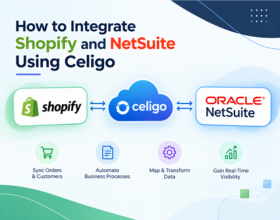
Celigo helps connect Shopify and NetSuite so important business data can move automatically between the two platforms.
Celigo's Shopify-NetSuite Integration App provides prebuilt flows for areas such as orders, customers, products, inventory, fulfillment, and billing.
2. Why Integrate Shopify with NetSuite?
Shopify manages the e-commerce side of the business, while NetSuite can manage ERP processes such as accounting, inventory, fulfillment, and financial operations.
Without integration, teams may have to:
- Enter Shopify orders into NetSuite manually
- Update inventory in multiple systems
- Transfer customer information
- Check fulfillment status manually
- Reconcile financial information
Integration removes much of this repetitive work.
3. What Can You Integrate Between Shopify and NetSuite?
| Shopify | NetSuite |
|---|---|
| Orders | Sales Orders / Cash Sales |
| Customers | Customers |
| Products | Items |
| Inventory | Inventory Levels |
| Fulfillment | Item Fulfillment |
| Billing | Invoices |
| Payments | Customer Deposits / Transactions |
| Refunds | Refund Transactions |
The exact flows and records depend on your business requirements and Celigo configuration.
4. How Celigo Connects Shopify and NetSuite
Celigo's integrator.io acts as the integration layer between Shopify and NetSuite.
A simplified architecture looks like:
Shopify → Celigo → NetSuite
and for data moving in the opposite direction:
NetSuite → Celigo → Shopify
For example, when a customer places an order in Shopify, Celigo can transfer the order and associated customer information into NetSuite based on the configured mappings.
The goal of the integration is not simply to connect two systems. It is to create a reliable flow of business data so teams can manage orders, inventory, fulfillment, and financial processes without repeatedly entering the same information.
5. Prerequisites Before Starting
Before implementing the integration, prepare both Shopify and NetSuite.
Important requirements can include:
- Shopify store access
- NetSuite account access
- Required NetSuite permissions
- Celigo/integrator.io account
- Required NetSuite bundles or SuiteApps
- Shopify authentication
- Product and SKU alignment
- Clearly defined business processes
Celigo's current setup documentation also requires configuring the appropriate Shopify and NetSuite connections before enabling integration flows.
6. Install the Celigo Shopify-NetSuite Integration
Start by logging into integrator.io and installing the Shopify-NetSuite integration app or the appropriate Shopify-NetSuite template.
Celigo's installation process includes configuring the NetSuite connection, configuring the Shopify connection, installing the required NetSuite components, and completing the initial configuration.
After installation, the integration flows can be configured according to your business requirements.
7. Configure the NetSuite Connection
The first major configuration step is connecting NetSuite to Celigo.
The connection allows Celigo to read and write the required NetSuite records.
Depending on the implementation, this can involve:
- NetSuite account details
- Authentication
- Roles and permissions
- Required bundles or SuiteApps
- Record access
The authentication method should be selected according to the current Celigo and NetSuite setup requirements.
8. Configure the Shopify Connection
Next, configure the Shopify connection in Celigo.
Celigo's current Shopify-NetSuite integration documentation uses OAuth 2.0 for the Shopify connection and requires appropriate Shopify authorization.
The connection should be tested before moving forward with production data.
9. Set Up Products and SKU Mapping
Product synchronization is one of the most important parts of a Shopify-NetSuite integration.
The same product needs to be correctly identified in both systems.
For example:
Shopify SKU: SHOE-1001
NetSuite Item: SHOE-1001
Celigo provides product and item flows to help maintain the required mappings between Shopify products and NetSuite items.
Incorrect SKU or item mapping can cause order and inventory synchronization failures.
10. Configure Shopify Orders to NetSuite
One of the most important workflows is:
Shopify Order → NetSuite Sales Order/Cash Sale
Celigo supports Shopify order flows that can transfer orders and associated customer information into NetSuite.
Depending on the configuration, orders can be created as Sales Orders or Cash Sales, and different flow options are available for real-time or scheduled processing.
You can configure mappings for information such as:
- Customer
- SKU
- Quantity
- Price
- Tax
- Discount
- Shipping
- Payment method
11. Sync Inventory from NetSuite to Shopify
Inventory accuracy is critical for e-commerce businesses.
A common flow is:
NetSuite Inventory → Celigo → Shopify Inventory
When inventory changes in NetSuite, the integration can transfer inventory information to Shopify.
This helps reduce situations where customers purchase products that are no longer available.
Celigo's Shopify-NetSuite integration includes inventory export capabilities from NetSuite to Shopify.
Inventory synchronization should be designed carefully. If a business operates multiple warehouses, locations, or sales channels, inventory mapping and location rules should be defined before enabling production flows.
12. Sync Fulfillment and Shipping Information
Once an order is fulfilled, fulfillment information may need to move between NetSuite and Shopify.
For example:
NetSuite Fulfillment → Celigo → Shopify
Celigo provides flows for transferring fulfillment information, including tracking and package details, between the systems.
This helps customers see accurate order and shipment information in Shopify.
13. Configure Customers, Billing, and Payments
The integration can also cover customer and financial processes.
Common workflows include:
- Shopify customer → NetSuite customer
- Shopify transaction → NetSuite transaction
- NetSuite billing → Shopify
- Refund information between systems
Celigo's Shopify-NetSuite Integration App supports customer synchronization as well as billing and transaction-related flows.
14. Configure Field Mapping and Business Rules
Every business has different requirements.
For example, you may need to map:
Shopify Customer Email → NetSuite Email
or:
Shopify SKU → NetSuite Item
Celigo allows out-of-the-box data flows to be customized and fine-tuned for areas including orders, fulfillment, inventory, billing, and products.
Business rules can also be added for specific scenarios such as discounts, taxes, shipping methods, payment methods, and customer handling.
15. Test the Integration Before Going Live
Never enable every production flow immediately.
Start with a controlled test.
A simple testing process is:
- Create a test product.
- Confirm the SKU exists in both systems.
- Create a test Shopify customer.
- Place a test order.
- Confirm the order reaches NetSuite.
- Verify customer and item information.
- Test fulfillment.
- Verify inventory updates.
- Check billing and payment information.
- Review integration errors.
Celigo recommends completing setup and foundational flows before enabling transactional flows in its current Shopify-NetSuite templates.
16. Monitor and Maintain the Integration
Integration does not end after deployment.
Regularly monitor:
- Failed records
- Order synchronization
- Inventory updates
- Fulfillment status
- API errors
- Mapping issues
- Duplicate records
- Authentication problems
A good monitoring process helps identify issues before they affect customers or business operations.
The Bottom Line
Integrating Shopify and NetSuite using Celigo can automate critical e-commerce and ERP processes while reducing manual data entry and improving data consistency.
A successful implementation should focus on more than simply connecting the two platforms. Product mapping, order flows, inventory, fulfillment, business rules, testing, and monitoring all play an important role.
With the right integration design, Shopify can handle the customer-facing commerce experience while NetSuite manages the underlying ERP and operational processes.
Need Help with Shopify-NetSuite Integration?
Integratt helps businesses design, implement, customize, and manage Shopify-NetSuite integrations using Celigo.
From order and inventory synchronization to fulfillment, customer, and financial workflows, we can help build an integration aligned with your business processes.
Talk to Integratt about your Shopify-NetSuite integration requirements.
Start with your most important business process instead of enabling every integration flow at once. For most e-commerce businesses, a good starting point is Products → Customers → Orders → Inventory → Fulfillment. Test each process carefully before expanding the integration to refunds, billing, payouts, and other advanced workflows.
Ready to modernize your integration stack?
Our certified integration architects can help you design, build, and scale reliable connections across your business systems. Book a free consultation to get started.