How to Choose the Right iPaaS: Boomi, Celigo, Workato or MuleSoft?
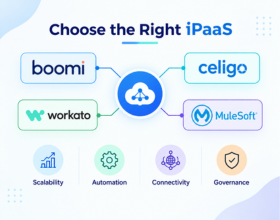
1.How to Choose the Right iPaaS: Boomi, Celigo, Workato or MuleSoft?
Modern businesses rarely operate with a single application. A typical organization may use an ERP, CRM, e-commerce platform, payment system, warehouse platform, data warehouse, marketing applications, and custom APIs.
Connecting these systems manually can create duplicate data, disconnected processes, and unnecessary operational work. An Integration Platform as a Service (iPaaS) provides a centralized way to connect applications, move data, automate processes, and manage integrations.
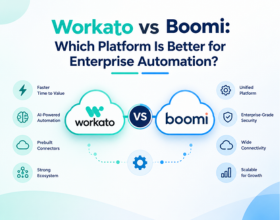
Boomi, Celigo, Workato, and MuleSoft are all established platforms, but they approach integration from somewhat different perspectives. Boomi provides broad application, data, API, and hybrid integration capabilities; Celigo has a strong process-centric and NetSuite/e-commerce focus; Workato emphasizes enterprise automation and orchestration; and MuleSoft's Anypoint Platform combines integration with extensive API design and management capabilities.
The right choice depends on your business processes, application landscape, technical requirements, integration complexity, team skills, and long-term roadmap.
2. What Should You Look for in an iPaaS?
An iPaaS should solve your actual integration requirements rather than simply provide a large list of connectors.
Before comparing vendors, identify the systems you need to connect and the processes you want to automate. Consider whether you need application integration, data synchronization, APIs, B2B/EDI, workflow automation, or a combination of these capabilities.
Other factors include deployment requirements, security, monitoring, governance, implementation effort, scalability, and the technical skills available within your team.
Start with your integration strategy, not the platform name. First define what you need to connect, what data needs to move, how frequently it needs to move, and which processes should be automated.
3. Boomi: Broad Enterprise Integration
Boomi provides capabilities for connecting applications, data sources, APIs, and other systems. Its platform also supports hybrid deployment, allowing integration workloads to operate across cloud, on-premises, and other environments.
Boomi can be considered when an organization has a broad application landscape and needs more than straightforward SaaS-to-SaaS automation.
Its platform also extends beyond core integration into areas such as API management, EDI, data management, and workflow automation.
This makes it relevant for organizations building a wider enterprise integration architecture.
4. Celigo: Process-Centric and E-Commerce Integration
Celigo takes a process-centric approach to integration and automation. It has particularly strong capabilities around NetSuite and e-commerce ecosystems.
Celigo provides prebuilt integrations for applications such as Shopify, Salesforce, Amazon, and many other systems. Its NetSuite offering includes prebuilt integrations and templates covering areas such as e-commerce, finance, supply chain, and EDI.
For businesses where NetSuite is the center of the technology landscape, prebuilt business-process integrations can reduce the amount of work required to create common workflows.
5. Workato: Automation and Orchestration
Workato combines application integration with workflow automation and orchestration. Its platform is designed to connect applications, data, APIs, and business processes while providing enterprise governance capabilities.
Workato uses automation workflows to connect systems and execute multi-step business processes. Its current enterprise offerings also include advanced orchestration, security, data, governance, and agentic capabilities.
This approach can be relevant for organizations where the primary objective is not just moving data between systems but automating complete business processes.
6. MuleSoft: Integration and API-Led Architecture
MuleSoft's Anypoint Platform combines application integration, API design, API management, deployment, and monitoring.
Its platform provides tools such as Anypoint API Designer, Anypoint Code Builder, Exchange, Runtime Manager, and API Manager. MuleSoft supports API design using specifications including RAML, OAS, AsyncAPI, and GraphQL.
MuleSoft can therefore be particularly relevant to organizations where API strategy and API-led connectivity are central to the overall architecture.
7. Boomi vs Celigo vs Workato vs MuleSoft
| Area | Boomi | Celigo | Workato | MuleSoft |
|---|---|---|---|---|
| Application Integration | Strong | Strong | Strong | Strong |
| E-Commerce | Strong | Particularly strong | Strong | Strong |
| NetSuite | Strong | Particularly strong | Strong | Strong |
| Workflow Automation | Strong | Strong | Particularly strong | Strong |
| API Management | Strong | Strong | Strong | Particularly strong |
| Hybrid Integration | Strong | Supported | Available | Strong |
| Prebuilt Business Integrations | Strong | Particularly strong | Strong | Strong |
| Customization | Strong | Strong | Strong | Very Strong |
| Enterprise Integration | Strong | Strong | Strong | Strong |
| Best Starting Point | Broad integration | E-commerce / NetSuite | Automation | API-led enterprise architecture |
This is a capability comparison, not a ranking. The right platform depends on the specific architecture and requirements of the business.
8. E-Commerce and ERP Integration
For e-commerce companies, the choice may be influenced heavily by the ERP and commerce platforms already in use.
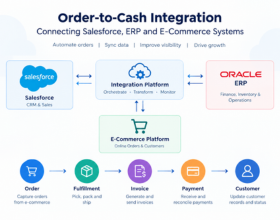
For example, a business running Shopify + NetSuite + 3PL + Salesforce may have different requirements from a large enterprise running SAP + Salesforce + databases + legacy applications + hundreds of APIs.
Celigo has extensive prebuilt NetSuite integrations and specifically highlights use cases across e-commerce, finance, supply chain, and EDI.
Boomi, Workato, and MuleSoft can also support broad application integration, but the implementation approach and amount of prebuilt business-process functionality may differ.
For an e-commerce organization, therefore, compare the platforms using an actual process such as:
Shopify → Integration Platform → NetSuite → 3PL
rather than comparing connectors in isolation.
9. API Integration and Management
APIs are increasingly central to enterprise integration. Businesses use APIs to expose services, connect applications, enable partners, and support modern application architectures.
Boomi provides API management as part of its enterprise platform.
Workato provides API capabilities alongside its automation and orchestration platform.
MuleSoft places particularly strong emphasis on API design, governance, security, lifecycle management, and API management through Anypoint Platform.
When API management is important, evaluate API design, security policies, governance, monitoring, developer experience, lifecycle management, and deployment—not simply whether an API connector exists.
10. Customization and Complex Integration Requirements
Standard integrations are useful, but enterprise environments frequently require custom business logic.
You may need custom transformations, complex routing, legacy connectivity, proprietary APIs, advanced error handling, or integration with applications that do not have a standard connector.
Boomi supports custom connectivity through its Connector SDK.
MuleSoft provides developer-oriented capabilities through Anypoint Code Builder and supports building APIs and integrations using reusable components and development tools.
Celigo and Workato also support customized workflows beyond their prebuilt integrations and automation capabilities.
The key question is how much customization your environment requires and who will maintain it.
11. Ease of Use and Team Skills
The people responsible for building and maintaining integrations are just as important as the platform itself.
A business-led automation team may prioritize an intuitive interface and reusable workflows, while an enterprise integration team may require deeper development, API, deployment, and governance capabilities.
Workato emphasizes automation and orchestration, while Celigo emphasizes accessibility alongside integration capabilities. Boomi provides visual integration development, and MuleSoft provides both visual and code-based development options.
Before selecting a platform, evaluate your team's current skills and the level of technical ownership you expect after implementation.
12. Scalability, Security and Governance
An integration platform should support today's requirements without creating unnecessary limitations as the business grows.
Evaluate how each platform handles increasing transaction volumes, additional applications, multiple environments, security controls, monitoring, and governance.
Boomi supports cloud, on-premises, and hybrid environments. MuleSoft provides centralized deployment and monitoring through Runtime Manager across cloud and on-premises environments. Workato's enterprise offerings include security, data, and governance capabilities, while Celigo provides governance, scalability, security, and error-management capabilities.
Key areas to evaluate:
- Security and authentication
- Role-based access
- Environment management
- Monitoring and alerting
- Error handling
- API governance
- Data protection
- Audit requirements
- Deployment model
- Scalability
13. How to Evaluate the Total Cost
The platform subscription is only one part of the total cost of an integration strategy.
Consider implementation, development, maintenance, monitoring, support, internal resources, partner services, and future integrations.
Pricing structures also differ. For example, Workato documents a usage-based pricing model, while other platforms use different commercial structures and packaging.
Instead of comparing only license prices, calculate the expected total cost of ownership over several years.
A platform that requires less custom development for your most important processes may have a different overall cost profile from one that requires more implementation work but provides greater flexibility for future requirements.
14. How to Choose the Right iPaaS
The selection process should begin with a clear list of your current and future integration requirements.
Start by asking:
- Which applications need to be connected?
- Which business processes need automation?
- Which systems are cloud, on-premises, or hybrid?
- What data volumes do you expect?
- Which integrations require real-time processing?
- How important are APIs?
- How much customization is required?
- Who will build and maintain the integrations?
- What security and governance requirements apply?
- What applications might need to be added in the future?
Then select two or three realistic business processes and run a proof of concept.
For example:
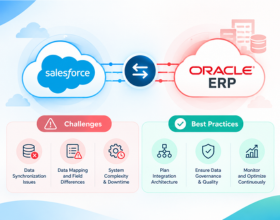
Salesforce → ERP → Finance
or:
Shopify → NetSuite → 3PL
Evaluate implementation effort, data mapping, error handling, monitoring, performance, maintenance, and the experience of the team that will operate the solution.
Don't choose an iPaaS based on the number of connectors alone. A platform can have hundreds of connectors and still require significant customization for your specific business process.
15. The Bottom Line
Boomi, Celigo, Workato, and MuleSoft can all support enterprise integration, but their strengths and approaches differ.
Boomi provides broad application, data, API, and hybrid integration capabilities.
Celigo has a strong process-centric approach, with extensive prebuilt integrations around NetSuite, e-commerce, finance, and supply chain use cases.
Workato focuses heavily on enterprise automation, orchestration, application connectivity, and governed automation.
MuleSoft combines integration with a strong API-led architecture, API design, governance, and management approach.
The right choice should ultimately be based on your application landscape, business processes, integration complexity, API strategy, technical skills, deployment requirements, governance needs, scalability, and total cost of ownership.
Before committing to an iPaaS, test one real business process rather than relying only on product demonstrations. Use a workflow such as Shopify → NetSuite, Salesforce → ERP, or CRM → Marketing Automation and compare how each platform handles connectivity, mapping, transformations, errors, monitoring, deployment, and ongoing maintenance. This gives your team practical evidence for the final platform decision.
Ready to modernize your integration stack?
Our certified integration architects can help you design, build, and scale reliable connections across your business systems. Book a free consultation to get started.