Salesforce Integration with Oracle ERP: Common Challenges and Best Practices
1.Salesforce Integration with Oracle ERP: Common Challenges and Best Practices
Salesforce and Oracle ERP serve different but connected areas of an enterprise. Salesforce is commonly used for sales, customer, and relationship management, while Oracle ERP supports financial, procurement, supply chain, and other back-office processes.
When these systems operate independently, teams may need to manually transfer customer, order, product, invoice, or payment information between platforms. This can lead to duplicate data, inconsistent records, and delays in business processes.
A well-designed integration connects the two systems and establishes reliable data flows between CRM and ERP processes.
Salesforce's integration guidance emphasizes selecting an integration pattern based on factors such as data volume, timing, direction, transactionality, and failure handling.
2. Why Integrate Salesforce with Oracle ERP?
The primary purpose of integration is to create a consistent flow of information between customer-facing and back-office operations.
For example, Salesforce can capture customer and sales information, while Oracle ERP can handle order processing, financial transactions, invoicing, and related ERP activities.
Instead of manually transferring information, an integration layer can automate the movement of relevant data.
This can help organizations:
- Reduce repetitive data entry
- Improve data consistency
- Give sales teams better visibility into ERP information
- Automate business processes
- Reduce delays between sales and operations
- Improve reporting across systems
3. Common Salesforce and Oracle ERP Data Flows
The exact data flows depend on the organization's processes and which system is responsible for each type of information.
| Data / Process | Typical Direction | Example |
|---|---|---|
| Customer / Account | Salesforce → Oracle ERP | Create or update customer |
| Contact | Salesforce → Oracle ERP | Synchronize contact information |
| Product / Item | Oracle ERP → Salesforce | Make product data available to sales |
| Opportunity | Salesforce → Oracle ERP | Transfer qualified sales information |
| Order | Salesforce → Oracle ERP | Create or process order |
| Invoice | Oracle ERP → Salesforce | Display invoice information |
| Payment | Oracle ERP → Salesforce | Update payment status |
| Inventory | Oracle ERP → Salesforce | Provide availability information |
Not every implementation requires all these flows. Start with the business processes that actually need cross-system synchronization.
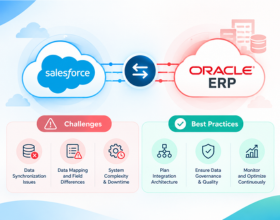
4. Challenge #1: Data Mapping and Different Data Models
One of the most common challenges is that Salesforce and Oracle ERP do not necessarily represent business data in the same way.
A Salesforce Account may correspond to a customer or another business entity in Oracle ERP. Similarly, Salesforce products and Oracle inventory items may use different identifiers, structures, and attributes.
For example:
Salesforce: Account Name
Oracle ERP: Customer Name
Salesforce: Product Code
Oracle ERP: Item Number
The integration must understand these differences and transform data appropriately.
Data mapping should be designed before integration development begins. Clearly define the source field, target field, transformation rule, and system responsible for maintaining the value.
5. Challenge #2: Choosing the Right Integration Architecture
A direct point-to-point connection may appear simple when only two systems are involved. However, enterprise environments often add CRM, e-commerce, payment, warehouse, analytics, and other applications over time.
A common architecture is:
Salesforce → Integration Layer → Oracle ERP
and:
Oracle ERP → Integration Layer → Salesforce
An iPaaS or integration platform can provide a central location for authentication, transformation, orchestration, monitoring, and error handling.
Salesforce's architecture guidance recommends considering process, data, and virtual integration patterns based on the requirements of the specific scenario.
6. Challenge #3: Real-Time vs Batch Integration
Not every piece of information needs to move in real time.
For example, a sales representative may need near-real-time visibility into an order status, while a large historical data synchronization may be better handled as a scheduled or bulk process.
Salesforce's architecture guidance recommends evaluating timing, data volume, direction, and user-experience requirements when selecting an integration pattern.
A good integration strategy therefore separates:
Real-time flows for time-sensitive business processes.
Scheduled or batch flows for high-volume or less time-sensitive data.
7. Challenge #4: API Limits and Large Data Volumes
Large enterprises can process thousands or millions of records across their systems.
Sending every record as an individual API request can create unnecessary load and increase the possibility of failures.
Salesforce provides different APIs for different data volumes and use cases, while Oracle Fusion Cloud Applications provides REST APIs for viewing and managing application data.
Oracle also documents a common integration anti-pattern: repeatedly calling an external API inside a loop for every individual record. Its guidance recommends using application capabilities that accept multiple records in a request where available.
For high-volume integrations, carefully design batching, pagination, scheduling, and retry behavior.
8. Challenge #5: Authentication and Security
Salesforce and Oracle ERP contain important business and customer information, so security must be part of the integration architecture.
Oracle Fusion Cloud Applications REST APIs support authentication and authorization mechanisms including OAuth 2.0, while access to REST resources depends on appropriate roles and privileges.
Salesforce also applies its platform security model and API access controls to integrations.
Important security practices include:
- Use dedicated integration credentials.
- Apply least-privilege access.
- Protect API credentials and tokens.
- Use encrypted connections.
- Restrict access to required objects and fields.
- Rotate credentials according to organizational policies.
- Monitor authentication failures.
9. Challenge #6: Duplicate and Inconsistent Records
Duplicate customers, contacts, products, or orders can create serious downstream problems.
For example, if the same customer is created separately in Salesforce and Oracle ERP without a reliable matching strategy, the integration may create duplicate customer records.
A strong integration should define a common matching strategy using identifiers such as external IDs, customer numbers, product codes, or other stable keys.
The integration should also clearly define which system is responsible for creating and updating each record.
10. Challenge #7: Error Handling and Monitoring
Even a well-designed integration will encounter errors.
An Oracle ERP request may fail because a required field is missing. Salesforce may reject a transaction because of validation rules or API limits. A temporary authentication or connectivity problem can also interrupt a data flow.
The integration should therefore provide visibility into failed transactions and make it possible to identify and recover from errors.
Salesforce's integration patterns specifically consider failure handling and transactionality as architectural concerns.
Don't treat error handling as an afterthought. Define what happens when a transaction fails, whether it should be retried, where the error should be recorded, and who should be notified.
11. Challenge #8: Business Rules and Data Transformation
Different departments may use different rules for customers, pricing, products, tax, orders, and financial information.
For example, Salesforce may use an opportunity stage to determine when information should be sent to Oracle ERP. Oracle ERP may then return an order or invoice status that needs to be translated into a Salesforce-friendly value.
The integration layer should handle these transformations rather than forcing either application to change its core business model unnecessarily.
This makes the integration easier to maintain when business rules change.
12. Best Practices for Salesforce and Oracle ERP Integration
A reliable integration starts with a clear understanding of business processes rather than simply connecting APIs.
Before development, document which systems own which data, how records are matched, when information should move, and how exceptions will be handled.
Recommended practices:
- Define a system of record for each major data object.
- Create detailed field-mapping documentation.
- Use stable external IDs for record matching.
- Separate real-time and batch requirements.
- Design retry and error-handling processes.
- Use appropriate APIs for the required data volume.
- Apply least-privilege security.
- Monitor integration activity continuously.
- Test high-volume scenarios before production.
- Document business rules and transformations.
Salesforce recommends considering factors such as timing, directionality, data volume, implementation complexity, maintainability, and platform limits when selecting integration approaches.
13. Testing and Deployment Strategy
Testing should cover individual integrations as well as complete business processes.
For example, an organization might test:
Salesforce Account → Oracle Customer
followed by:
Salesforce Opportunity → Oracle Order
and then:
Oracle Invoice → Salesforce
Testing should include both successful and unsuccessful scenarios.
Important areas to test include:
- Data mapping
- Record creation
- Record updates
- Duplicate handling
- Required fields
- API errors
- Authentication failures
- Large data volumes
- Retry behavior
- Partial failures
Start in sandbox or test environments and gradually move validated flows into production.
14. Designing for Scalability and Long-Term Maintenance
An integration that works for 10,000 transactions may require a different architecture when transaction volumes reach millions.
The architecture should therefore consider future growth from the beginning.
Avoid unnecessary point-to-point integrations and reusable business logic where practical. Keep mappings and transformation rules documented, and monitor API usage and integration performance.
Oracle's REST documentation also notes that REST resources can have different versions, making API version awareness important when designing integrations that need long-term stability.
Design for the business you expect to have—not only the business you have today. New applications, higher transaction volumes, additional regions, and new business processes can all change integration requirements.
15. The Bottom Line
Integrating Salesforce with Oracle ERP can connect sales, customer, financial, order, and operational processes across the enterprise.
The biggest challenges are usually not simply technical connectivity. Data mapping, system ownership, integration timing, API limits, security, duplicate handling, business rules, and error management all have a major impact on the reliability of the solution.
A successful integration starts with a clear architecture and well-defined data flows. From there, organizations should choose appropriate APIs and integration patterns, establish strong security controls, design for failures, and continuously monitor the production environment.
Oracle Fusion Cloud Applications provides REST APIs for accessing and managing application data, while Salesforce provides multiple integration patterns and APIs for connecting Salesforce with external systems.
Start your Salesforce-Oracle ERP integration with one high-value business process instead of connecting everything at once. A practical starting point could be Customer → Opportunity → Order → Invoice → Payment. Validate the data mapping, API performance, security, error handling, and monitoring for that flow before expanding to additional processes.
Ready to modernize your integration stack?
Our certified integration architects can help you design, build, and scale reliable connections across your business systems. Book a free consultation to get started.