How to Integrate Salesforce with NetSuite: Architecture, Data Flows and Best Practices
How to Integrate Salesforce with NetSuite: Architecture, Data Flows and Best Practices
Salesforce and NetSuite are widely used together because they serve different but complementary business functions. Salesforce manages customer-facing processes such as leads, opportunities, accounts, and sales activities, while NetSuite manages ERP processes such as orders, billing, financials, inventory, and fulfillment.
When these systems operate separately, teams may need to enter the same information multiple times or manually move data between applications. This can create duplicate records, outdated information, and unnecessary operational effort.
A Salesforce-NetSuite integration creates a connected flow of information between the CRM and ERP. Salesforce can send relevant customer and sales information to NetSuite, while NetSuite can return financial, order, inventory, or fulfillment information to Salesforce.
Salesforce recommends selecting integration patterns based on factors such as timing, direction, data volume, source and target systems, and exception-handling requirements.
2. Why Integrate Salesforce and NetSuite?
The main objective of integrating Salesforce and NetSuite is to create a consistent flow of business information between sales and back-office operations.
For example, a sales representative may create an opportunity in Salesforce and eventually convert it into an order. Instead of manually recreating that information in NetSuite, an integration can transfer the required data automatically.
This can help businesses reduce duplicate data entry, improve visibility, and create smoother handoffs between sales, finance, operations, and fulfillment.
A well-designed integration also establishes clear ownership of data. Salesforce might be the system of record for customer and opportunity information, while NetSuite may be the system of record for invoices, payments, inventory, and financial transactions.
3. Salesforce and NetSuite Integration Architecture
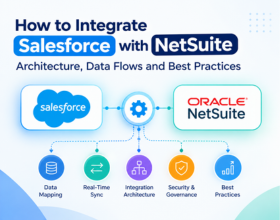
A typical architecture can use an iPaaS or integration layer between Salesforce and NetSuite rather than creating a tightly coupled point-to-point connection.
A simplified architecture looks like:
Salesforce → Integration Platform → NetSuite
and for reverse data flows:
NetSuite → Integration Platform → Salesforce
The integration layer handles authentication, data transformation, mapping, routing, error handling, monitoring, and orchestration.
This approach can make it easier to add additional applications later without redesigning the entire architecture.
The integration layer should do more than move data. It should provide a controlled place for transformation, business rules, error handling, monitoring, and security.
4. Choosing the Right Integration Approach
There is no single integration pattern that works for every Salesforce-NetSuite implementation.
The appropriate approach depends on whether data needs to move in real time, asynchronously, or on a schedule. Salesforce's architecture guidance specifically recommends evaluating timing, directionality, data volume, user experience, and exception handling when selecting an integration pattern.
For example, a business may want a customer record synchronized shortly after it is created, while large historical data transfers may be better handled through bulk or scheduled processing.
For most enterprise implementations, it is useful to separate real-time transactional flows from bulk or scheduled synchronization.
5. Key Salesforce-to-NetSuite Data Flows
A Salesforce-NetSuite integration can support many different business processes. The exact flows depend on the organization's operating model and which system owns each type of data.
| Business Data | Typical Direction | Example |
|---|---|---|
| Accounts / Customers | Salesforce → NetSuite | Create or update customer |
| Contacts | Salesforce → NetSuite | Synchronize customer contacts |
| Products / Items | NetSuite → Salesforce | Make product information available to sales |
| Opportunities | Salesforce → NetSuite | Transfer qualified sales information |
| Sales Orders | Salesforce → NetSuite | Create ERP order |
| Invoices | NetSuite → Salesforce | Display billing information |
| Payments | NetSuite → Salesforce | Show payment status |
| Inventory | NetSuite → Salesforce | Provide product availability |
Not every organization needs every flow. The most important step is determining which processes actually require synchronization.
6. Customer and Account Synchronization
Customer synchronization is usually one of the first flows considered in a Salesforce-NetSuite integration.
For example:
Salesforce Account → Integration Layer → NetSuite Customer
When a new customer is created or updated in Salesforce, the integration can transform the Salesforce account information into the format required by NetSuite.
Important fields can include company name, address, phone number, email, customer type, payment terms, sales information, and external IDs.
The integration should also define how updates are handled when the same customer changes in both systems.
7. Opportunity-to-Order Data Flow
One of the most valuable Salesforce-NetSuite workflows is connecting the sales process with ERP order processing.
A typical process could look like:
Salesforce Opportunity → Closed Won → Integration → NetSuite Sales Order
Once an opportunity reaches the appropriate stage, the integration can transfer relevant customer, product, quantity, pricing, and other information to NetSuite.
However, the exact trigger should be based on the business process. Not every Closed Won opportunity should automatically become a NetSuite order.
Business rules may be required to determine when an opportunity is ready for ERP processing.
8. NetSuite-to-Salesforce Data Flows
Integration should not only move information from Salesforce to NetSuite.
NetSuite may also need to send information back to Salesforce so sales and customer-facing teams have visibility into ERP activity.
Typical reverse flows can include:
- Invoice status
- Payment status
- Sales order status
- Fulfillment information
- Product information
- Inventory availability
This creates a more complete view of the customer journey inside Salesforce without requiring sales teams to constantly switch between systems.
9. APIs and Integration Technologies
Salesforce provides several integration options, including REST API and Bulk API 2.0. Salesforce states that REST API can be used for creating, updating, deleting, and querying data, while Bulk API 2.0 is designed for large-scale asynchronous data operations.
NetSuite provides SuiteTalk REST Web Services for interacting with NetSuite records and running queries. Oracle's current documentation recommends REST Web Services for new integrations, with OAuth 2.0 as the preferred authentication method.
This is particularly important for new implementations because Oracle has announced the planned removal of NetSuite SOAP Web Services, with SOAP no longer available in NetSuite from the 2028.2 release.
10. Data Mapping and Transformation
Salesforce and NetSuite do not always use the same field names, formats, or business structures.
For example:
Salesforce: Account Name
NetSuite: Company Name
Or:
Salesforce: Opportunity Amount
NetSuite: Transaction Total
The integration layer should map these fields and transform values where necessary.
Data transformation may involve changing date formats, currencies, addresses, status values, IDs, product codes, or other business-specific information.
Before development begins, create a clear mapping document showing the source field, target field, transformation rule, and ownership.
11. Authentication and Security
Security should be considered from the beginning of the integration design rather than added after development.
Salesforce APIs respect configured object-level and field-level security based on the authenticated user.
For NetSuite, access to REST APIs and data is controlled through roles and permissions. Salesforce's current NetSuite connector documentation also describes token-based authentication and the required NetSuite permissions for REST API access.
Use dedicated integration credentials where appropriate, restrict permissions to the data and operations actually required, and avoid storing credentials directly inside integration logic.
12. Error Handling and Monitoring
No integration is completely free from errors.
A Salesforce-NetSuite integration can fail because of invalid data, missing required fields, authentication problems, API limits, duplicate records, incorrect mappings, or temporary system issues.
A reliable integration should provide clear error visibility and a defined recovery process.
The integration team should be able to determine what failed, why it failed, which record was affected, and whether the transaction can be safely retried.
Salesforce also highlights exception handling, retry, notification, and failure considerations when selecting integration patterns.
An integration is not truly production-ready if the team cannot easily identify and recover from failed transactions. Monitoring and error handling should be designed alongside the data flows.
13. Testing and Deployment Strategy
Testing should cover both individual data flows and complete end-to-end business processes.
A typical testing cycle should validate customer creation, account updates, opportunity processing, order creation, invoice synchronization, product information, and error scenarios.
Important testing areas:
- Field mapping and transformations
- New record creation
- Record updates
- Duplicate handling
- Required fields
- Error scenarios
- API limits
- Authentication
- Retry behavior
- Large data volumes
Start in sandbox or test environments before moving the integration into production.
14. Best Practices for Salesforce-NetSuite Integration
A successful integration depends on architecture as much as technology.
Keep the integration design simple where possible, clearly define which system owns each data object, and avoid unnecessary two-way synchronization.
Some important practices include:
- Define a system of record for every major data object.
- Use external IDs to support reliable record matching.
- Separate real-time and batch integration requirements.
- Use REST-based integration approaches for new NetSuite integrations.
- Minimize unnecessary API calls.
- Build clear error-handling and retry mechanisms.
- Monitor integrations continuously.
- Document mappings and business rules.
- Test high-volume scenarios before production.
Salesforce specifically recommends considering data volume and API efficiency when designing integrations, while Oracle recommends REST Web Services for new NetSuite integrations.
15. The Bottom Line
A Salesforce-NetSuite integration can connect the front-office sales process with back-office ERP operations, giving teams more consistent data and reducing repetitive manual work.
The most successful implementations start with business processes rather than connectors. Before building the integration, define what data needs to move, which system owns each record, how frequently data should synchronize, and what should happen when something fails.
A scalable architecture should provide clear data flows, secure authentication, reliable mapping, appropriate API usage, monitoring, and a practical recovery process.
With the right integration strategy, Salesforce and NetSuite can work together as part of a connected enterprise ecosystem rather than operating as separate systems.
Before building every possible Salesforce-NetSuite integration flow, start with the processes that create the greatest business impact. A practical starting point is Customer → Opportunity → Sales Order → Invoice → Payment. Once these core flows are stable, expand into inventory, fulfillment, products, and other supporting processes.
Ready to modernize your integration stack?
Our certified integration architects can help you design, build, and scale reliable connections across your business systems. Book a free consultation to get started.